Shadcn/UI: Design Meets Development
Introduction
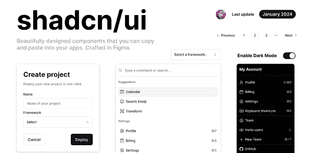
In the rapidly evolving world of React development, shadcn/ui has emerged as a game-changing approach to building user interfaces. Unlike traditional component libraries that you install as dependencies, shadcn/ui takes a fundamentally different approach: it's a collection of beautifully designed, accessible components that you copy and paste directly into your codebase.
Created by shadcn (Shadcn Mirsad), this innovative library has gained massive popularity among developers for its unique philosophy of giving you complete ownership and control over your components while maintaining high standards of accessibility and design.
What Makes shadcn/ui Different?
The Copy-Paste Philosophy
The core principle that sets shadcn/ui apart from other component libraries is its copy-paste approach. Instead of installing a package that adds to your bundle size and creates external dependencies, you simply copy the component code directly into your project. This means:
- Full ownership: The components become part of your codebase
- Complete customization: No limitations imposed by external APIs
- Zero external dependencies: Reduces bundle size and dependency conflicts
- Direct modification: Change anything you want without workarounds
Built on Modern Foundations
shadcn/ui is built on top of several cutting-edge technologies:
- React: Modern React patterns and hooks
- Tailwind CSS: Utility-first CSS framework for styling
- Radix UI: Headless, accessible component primitives
- TypeScript: Full type safety and excellent developer experience
- Framer Motion: Smooth animations and transitions (optional)
Core Features and Benefits
1. Accessibility First
Every component in shadcn/ui is built with accessibility in mind:
- ARIA attributes properly implemented
- Keyboard navigation fully supported
- Screen reader friendly
- Focus management handled correctly
- WCAG 2.1 compliance standards met
2. Modern Design System
The components follow contemporary design principles:
- Clean, minimalist aesthetics
- Consistent spacing and typography
- Thoughtful use of shadows and borders
- Responsive design patterns
- Dark mode support built-in
3. Developer Experience
shadcn/ui prioritizes an excellent developer experience:
- TypeScript support out of the box
- Comprehensive documentation
- Interactive examples
- CLI tool for easy component installation
- IDE integration with proper intellisense
4. Performance Optimized
- Tree-shakable: Only include what you use
- Lightweight: Minimal runtime overhead
- Fast rendering: Optimized React patterns
- Bundle size friendly: No large external dependencies
Available Components
shadcn/ui offers a comprehensive set of components covering all common UI needs:
Form Components
- Button: Various styles and sizes with loading states
- Input: Text inputs with validation states
- Textarea: Multi-line text input
- Select: Dropdown selection with search
- Checkbox: Boolean input with indeterminate state
- Radio Group: Single selection from multiple options
- Switch: Toggle switch component
- Slider: Range input for numeric values
- Date Picker: Calendar-based date selection
Layout Components
- Card: Content containers with headers and footers
- Dialog: Modal dialogs and popups
- Sheet: Slide-out panels and drawers
- Tabs: Tabbed content organization
- Accordion: Collapsible content sections
- Separator: Visual content dividers
- Avatar: User profile images with fallbacks
- Badge: Labels and status indicators
Navigation Components
- Navigation Menu: Dropdown navigation systems
- Breadcrumb: Hierarchical navigation trails
- Pagination: Page navigation controls
- Command: Command palette interfaces
Data Display
- Table: Data tables with sorting and filtering
- Data Table: Advanced table with built-in features
- Calendar: Full calendar component
- Progress: Progress bars and indicators
- Skeleton: Loading placeholders
- Toast: Notification messages
Feedback Components
- Alert: Important messages and notifications
- Alert Dialog: Confirmation dialogs
- Tooltip: Contextual information on hover
- Popover: Floating content containers
- Loading Spinner: Activity indicators
Installation and Setup
Prerequisites
Before getting started with shadcn/ui, ensure you have:
- Node.js (version 16 or higher)
- React project set up
- Tailwind CSS configured
- TypeScript (recommended)
Step 1: Initialize shadcn/ui
npx shadcn-ui@latest init
This command will:
- Install necessary dependencies
- Configure your
tailwind.config.js - Set up CSS variables
- Create a
components.jsonconfiguration file
Step 2: Install Components
Install individual components as needed:
npx shadcn-ui@latest add button
npx shadcn-ui@latest add card
npx shadcn-ui@latest add dialog
Or install multiple components at once:
npx shadcn-ui@latest add button card dialog input
Step 3: Use Components
Import and use components in your React application:
import { Button } from "@/components/ui/button"
import { Card, CardContent, CardHeader, CardTitle } from "@/components/ui/card"

function MyComponent() {
  return (
    <Card>
      <CardHeader>
        <CardTitle>Welcome to shadcn/ui</CardTitle>
      </CardHeader>
      <CardContent>
        <p>This is a beautiful, accessible card component.</p>
        <Button className="mt-4">Get Started</Button>
      </CardContent>
    </Card>
  )
}
Customization and Theming
CSS Variables Approach
shadcn/ui uses CSS variables for theming, making it easy to customize:
:root {
  --background: 0 0% 100%;
  --foreground: 222.2 84% 4.9%;
  --primary: 222.2 47.4% 11.2%;
  --primary-foreground: 210 40% 98%;
  /* ... more variables */
}

.dark {
  --background: 222.2 84% 4.9%;
  --foreground: 210 40% 98%;
  --primary: 210 40% 98%;
  --primary-foreground: 222.2 47.4% 11.2%;
  /* ... dark mode variables */
}
Component Customization
Since you own the component code, customization is straightforward:
// Modify the Button component directly
const Button = React.forwardRef<
  HTMLButtonElement,
  ButtonProps
>(({ className, variant, size, ...props }, ref) => {
  return (
    <button
      className={cn(
        // Your custom base styles here
        "inline-flex items-center justify-center rounded-md text-sm font-medium",
        // Add your own variants
        buttonVariants({ variant, size, className })
      )}
      ref={ref}
      {...props}
    />
  )
})
Theme Configuration
Customize the theme through the components.json configuration:
{
  "style": "default",
  "rsc": false,
  "tsx": true,
  "tailwind": {
    "config": "tailwind.config.js",
    "css": "app/globals.css",
    "baseColor": "slate",
    "cssVariables": true
  },
  "aliases": {
    "components": "@/components",
    "utils": "@/lib/utils"
  }
}
Advanced Usage Patterns
Building Composite Components
Combine multiple shadcn/ui components to create complex interfaces:
import { useState } from "react"
import { Button } from "@/components/ui/button"
import { Dialog, DialogContent, DialogHeader, DialogTitle, DialogTrigger } from "@/components/ui/dialog"
import { Input } from "@/components/ui/input"
import { Label } from "@/components/ui/label"

function UserProfileDialog() {
  const [open, setOpen] = useState(false)

  return (
    <Dialog open={open} onOpenChange={setOpen}>
      <DialogTrigger asChild>
        <Button variant="outline">Edit Profile</Button>
      </DialogTrigger>
      <DialogContent className="sm:max-w-[425px]">
        <DialogHeader>
          <DialogTitle>Edit Profile</DialogTitle>
        </DialogHeader>
        <div className="grid gap-4 py-4">
          <div className="grid grid-cols-4 items-center gap-4">
            <Label htmlFor="name" className="text-right">Name</Label>
            <Input id="name" className="col-span-3" />
          </div>
          <div className="grid grid-cols-4 items-center gap-4">
            <Label htmlFor="email" className="text-right">Email</Label>
            <Input id="email" type="email" className="col-span-3" />
          </div>
        </div>
        <div className="flex justify-end gap-2">
          <Button variant="outline" onClick={() => setOpen(false)}>
            Cancel
          </Button>
          <Button onClick={() => setOpen(false)}>
            Save Changes
          </Button>
        </div>
      </DialogContent>
    </Dialog>
  )
}
Form Integration
shadcn/ui works excellently with form libraries like React Hook Form:
import { useForm } from "react-hook-form"
import { zodResolver } from "@hookform/resolvers/zod"
import * as z from "zod"
import { Button } from "@/components/ui/button"
import { Form, FormControl, FormField, FormItem, FormLabel, FormMessage } from "@/components/ui/form"
import { Input } from "@/components/ui/input"

const formSchema = z.object({
  username: z.string().min(2).max(50),
  email: z.string().email(),
})

function ProfileForm() {
  const form = useForm<z.infer<typeof formSchema>>({
    resolver: zodResolver(formSchema),
    defaultValues: {
      username: "",
      email: "",
    },
  })

  function onSubmit(values: z.infer<typeof formSchema>) {
    console.log(values)
  }

  return (
    <Form {...form}>
      <form onSubmit={form.handleSubmit(onSubmit)} className="space-y-8">
        <FormField
          control={form.control}
          name="username"
          render={({ field }) => (
            <FormItem>
              <FormLabel>Username</FormLabel>
              <FormControl>
                <Input placeholder="Enter username" {...field} />
              </FormControl>
              <FormMessage />
            </FormItem>
          )}
        />
        <FormField
          control={form.control}
          name="email"
          render={({ field }) => (
            <FormItem>
              <FormLabel>Email</FormLabel>
              <FormControl>
                <Input type="email" placeholder="Enter email" {...field} />
              </FormControl>
              <FormMessage />
            </FormItem>
          )}
        />
        <Button type="submit">Submit</Button>
      </form>
    </Form>
  )
}
Integration with Popular Frameworks
Next.js Integration
shadcn/ui works seamlessly with Next.js, including App Router:
// app/page.tsx
import { Button } from "@/components/ui/button"
import { Card, CardContent, CardHeader, CardTitle } from "@/components/ui/card"

export default function Home() {
  return (
    <main className="container mx-auto py-8">
      <Card className="max-w-md mx-auto">
        <CardHeader>
          <CardTitle>Next.js + shadcn/ui</CardTitle>
        </CardHeader>
        <CardContent>
          <p className="text-muted-foreground mb-4">
            Perfect integration with Next.js App Router
          </p>
          <Button className="w-full">Get Started</Button>
        </CardContent>
      </Card>
    </main>
  )
}
Vite Integration
Works perfectly with Vite-based React applications:
// src/App.tsx
import { useState } from 'react'
import { Button } from './components/ui/button'
import { Card, CardContent, CardHeader, CardTitle } from './components/ui/card'

function App() {
  const [count, setCount] = useState(0)

  return (
    <div className="min-h-screen bg-background flex items-center justify-center">
      <Card className="w-96">
        <CardHeader>
          <CardTitle>Vite + React + shadcn/ui</CardTitle>
        </CardHeader>
        <CardContent className="space-y-4">
          <p className="text-center text-2xl font-bold">{count}</p>
          <Button
            onClick={() => setCount(count + 1)}
            className="w-full"
          >
            Increment
          </Button>
        </CardContent>
      </Card>
    </div>
  )
}

export default App
Best Practices
1. Component Organization
Organize your components in a logical structure:
src/
  components/
    ui/           # shadcn/ui components
      button.tsx
      card.tsx
      dialog.tsx
    common/       # Your custom components
      header.tsx
      footer.tsx
    features/     # Feature-specific components
      user-profile/
      dashboard/
2. Styling Conventions
Follow consistent styling patterns:
// Use semantic CSS variables
const Card = ({ className, ...props }) => (
  <div
    className={cn(
      "rounded-lg border bg-card text-card-foreground shadow-sm",
      className
    )}
    {...props}
  />
)

// Create your own variants
const buttonVariants = cva(
  "inline-flex items-center justify-center rounded-md text-sm font-medium",
  {
    variants: {
      variant: {
        default: "bg-primary text-primary-foreground hover:bg-primary/90",
        destructive: "bg-destructive text-destructive-foreground hover:bg-destructive/90",
        // Add your custom variants
        gradient: "bg-gradient-to-r from-purple-500 to-blue-500 text-white",
      },
    },
  }
)
3. Accessibility Guidelines
Always maintain accessibility standards:
// Proper ARIA attributes
<Button
  aria-label="Close dialog"
  aria-describedby="close-description"
>
  <X className="h-4 w-4" />
</Button>

// Keyboard navigation
const handleKeyDown = (event: KeyboardEvent) => {
  if (event.key === 'Escape') {
    setOpen(false)
  }
}

// Focus management
useEffect(() => {
  if (open) {
    buttonRef.current?.focus()
  }
}, [open])
4. Performance Optimization
Optimize for performance:
// Lazy load components
const Dialog = lazy(() => import('@/components/ui/dialog'))

// Memoize expensive computations
const processedData = useMemo(() => {
  return data.map(item => processItem(item))
}, [data])

// Use callback optimization
const handleClick = useCallback(() => {
  onAction(id)
}, [onAction, id])
Comparison with Other Libraries
shadcn/ui vs Material-UI (MUI)
| Feature | shadcn/ui | Material-UI |
|---|---|---|
| Approach | Copy-paste components | Installed package |
| Bundle Size | Minimal (only used components) | Larger bundle |
| Customization | Complete control | Theme-based customization |
| Design System | Modern, minimal | Material Design |
| TypeScript | Built-in support | Good support |
| Learning Curve | Moderate | Steeper |
| Community | Growing rapidly | Large, established |
shadcn/ui vs Ant Design
| Feature | shadcn/ui | Ant Design |
|---|---|---|
| Philosophy | Minimal, customizable | Feature-rich, opinionated |
| Component Ownership | Full ownership | External dependency |
| Design Language | Modern, clean | Professional, comprehensive |
| Bundle Impact | Tree-shakable | Full library import |
| Flexibility | Maximum flexibility | Good customization options |
shadcn/ui vs Chakra UI
| Feature | shadcn/ui | Chakra UI |
|---|---|---|
| Styling Approach | Tailwind CSS | CSS-in-JS |
| Component Library | Copy-paste | Installed components |
| Theme System | CSS variables | JavaScript objects |
| Performance | Optimal | Good |
| Dark Mode | Built-in CSS variables | Theme switching |
Recent Updates and Roadmap (2025)
Latest Features
As of 2025, shadcn/ui has introduced several exciting features:
- Registry 2.0: Enhanced registry schema supporting more features with flat JSON file distribution via CLI
- Custom Styles Support: Bring your own design system, components & tokens
- Third-party Registries: Extend, override, mix & match components from third-party registries and LLMs
- Theme Installation: Install themes, CSS configurations directly through the CLI
- Figma Integration: Major Figma kit update with Tailwind v4 compatibility, featuring a revamped variable system and expanded components
Community Growth
The shadcn/ui ecosystem continues to expand with:
- Community Components: Hundreds of community-contributed components
- Template Libraries: Ready-to-use application templates
- Integration Guides: Comprehensive guides for popular frameworks
- Plugin Ecosystem: Tools and plugins for enhanced development experience
Real-World Use Cases
1. SaaS Dashboards
shadcn/ui is perfect for building modern SaaS dashboards:
function DashboardLayout() {
  return (
    <div className="grid grid-cols-1 md:grid-cols-4 gap-6 p-6">
      <Card className="col-span-1">
        <CardHeader>
          <CardTitle>Total Revenue</CardTitle>
        </CardHeader>
        <CardContent>
          <div className="text-2xl font-bold">$45,231.89</div>
          <p className="text-xs text-muted-foreground">
            +20.1% from last month
          </p>
        </CardContent>
      </Card>

      <Card className="col-span-3">
        <CardHeader>
          <CardTitle>Recent Activity</CardTitle>
        </CardHeader>
        <CardContent>
          {/* Activity feed components */}
        </CardContent>
      </Card>
    </div>
  )
}
2. E-commerce Applications
Build beautiful product interfaces:
function ProductCard({ product }) {
  return (
    <Card className="group hover:shadow-lg transition-shadow">
      <CardContent className="p-0">
        <div className="aspect-square relative overflow-hidden rounded-t-lg">
          <img
            src={product.image}
            alt={product.name}
            className="object-cover w-full h-full group-hover:scale-105 transition-transform"
          />
        </div>
        <div className="p-4">
          <h3 className="font-semibold">{product.name}</h3>
          <p className="text-muted-foreground text-sm">{product.category}</p>
          <div className="flex items-center justify-between mt-2">
            <span className="text-lg font-bold">${product.price}</span>
            <Button size="sm">Add to Cart</Button>
          </div>
        </div>
      </CardContent>
    </Card>
  )
}
3. Content Management Systems
Create powerful admin interfaces:
function ContentEditor() {
  return (
    <div className="space-y-6">
      <Card>
        <CardHeader>
          <CardTitle>Article Settings</CardTitle>
        </CardHeader>
        <CardContent className="space-y-4">
          <div>
            <Label>Title</Label>
            <Input placeholder="Enter article title" />
          </div>
          <div>
            <Label>Category</Label>
            <Select>
              <SelectTrigger>
                <SelectValue placeholder="Select category" />
              </SelectTrigger>
              <SelectContent>
                <SelectItem value="tech">Technology</SelectItem>
                <SelectItem value="design">Design</SelectItem>
                <SelectItem value="business">Business</SelectItem>
              </SelectContent>
            </Select>
          </div>
          <div className="flex items-center space-x-2">
            <Switch id="published" />
            <Label htmlFor="published">Published</Label>
          </div>
        </CardContent>
      </Card>
    </div>
  )
}
Troubleshooting Common Issues
1. Styling Conflicts
If you encounter styling conflicts:
# Ensure Tailwind is properly configured
npm install -D tailwindcss postcss autoprefixer
npx tailwindcss init -p
Update your tailwind.config.js:
module.exports = {
  content: [
    "./src/**/*.{js,ts,jsx,tsx}",
    // Add other paths as needed
  ],
  theme: {
    extend: {},
  },
  plugins: [],
}
2. Import Errors
For import path issues:
// tsconfig.json
{
  "compilerOptions": {
    "baseUrl": ".",
    "paths": {
      "@/*": ["./src/*"]
    }
  }
}
3. Missing Dependencies
Install required peer dependencies:
npm install class-variance-authority clsx tailwind-merge
npm install lucide-react  # for icons
npm install @radix-ui/react-*  # for specific components
Conclusion
shadcn/ui represents a paradigm shift in how we approach component libraries. By giving developers complete ownership of their components while maintaining high standards of accessibility and design, it offers the perfect balance between flexibility and convenience.
The library's rapid adoption and growing ecosystem demonstrate its value in modern React development. Whether you're building a simple landing page or a complex enterprise application, shadcn/ui provides the tools and patterns needed to create beautiful, accessible user interfaces.
Key takeaways:
- Full Control: Own your components completely
- Modern Standards: Built on cutting-edge technologies
- Accessibility First: WCAG compliant out of the box
- Developer Experience: Excellent TypeScript support and tooling
- Performance: Minimal bundle impact with tree-shaking
- Community: Rapidly growing ecosystem and community support
As we move forward in 2025, shadcn/ui continues to evolve with new features, better tooling, and expanded ecosystem support. Its combination of accessibility, performance, and seamless integration makes it a compelling choice for developers seeking to elevate their UI development process.
Whether you're a seasoned React developer or just starting your journey, shadcn/ui offers a modern, flexible approach to building user interfaces that will serve you well in your development projects.
This article covers the essential aspects of shadcn/ui as of 2025. For the most up-to-date information, visit the official documentation at ui.shadcn.com.